- Pages & profiles with public email, phone and website
- Group members and group info
- Group, page and profile posts with photos and videos
- Comments, people who commented, people who reacted
- Friends, followers and following lists
- Marketplace listings, prices, sellers and photos
Free
New · Free for everyoneAurora Extract
Collect public data from Facebook, Instagram and TikTok — and download the photos and videos — into a clean spreadsheet. One extension, three platforms — pick one, open a page, press start. New: a free profile health check.
Chrome and Chromium browsers (Edge, Brave) on desktop · No account needed · Your data never leaves your computer
What it collectsEverything you’d copy by hand —
Everything you’d copy by hand —
in one click.
Only information your own logged-in account can already see. Photos and videos included.
- Profiles with business email, phone and website
- Posts and reels with full-size photos and real video files
- Followers and following lists
- Comments, people who commented, people who liked
- Hashtag pages
- Profiles with bio contacts and stats
- Videos with captions, hashtags, stats and the video file
- Followers and following lists
- Comments and people who commented
- Hashtag and search pages
CSVExcel (.xlsx)JSONPhotos & videos as ZIP
New Built in · freeHow healthy is your
How healthy is your
profile or page?
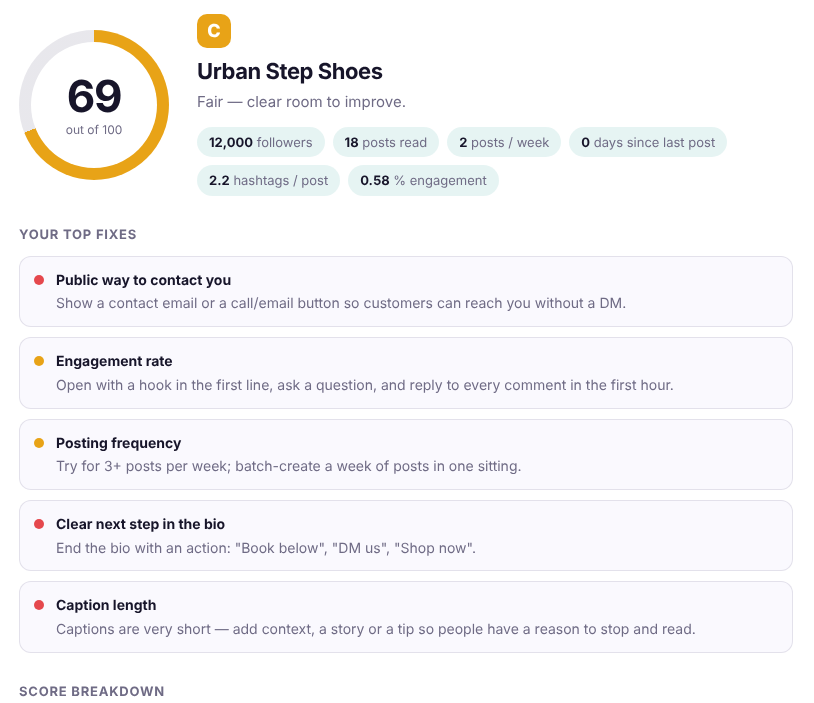
A free health check for any profile or page: a 0–100 score and a short list of fixes. Open a profile, choose Health check, and get your score in about a minute.
📝
Bio & profile
Is the bio clear, complete and ending with a next step?
🔗
Link & contact
Can people click through or reach you without a DM?
📅
Posting rhythm
How recent, how often, and how steady?
#️⃣
Captions & hashtags
Useful length, a call to action, the right number of hashtags.
💬
Engagement
Likes and comments compared with your audience, and whether people reply.
Works on Facebook pages and profiles, Instagram profiles and TikTok profiles. Choose Quick (10), Standard (20) or Deep (30) posts. Scored on your own computer — no AI service, nothing uploaded.
How it worksOpen. Choose.
Open. Choose.
Download.
Designed to be calm and obvious — whether it is your first extraction or your five-hundredth.
01
Open the page you want
A profile, a group, Marketplace, a post, a hashtag. Aurora Extract recognises it and offers what can be collected — and opens the right tab (like a group’s Members) for you.
02
Choose speed and size
Pick how many items, and Gentle, Normal or Fast. Watch progress live and stop any time — what is collected is kept.
03
Export
Search and filter the results, then download CSV, Excel or JSON — or a ZIP of every photo and video.
Install in about a minute
Add it from the Chrome Web Store
Press Add to Chrome on the listing and confirm. Chrome keeps it up to date for you.
Pin the sparkle icon
Click the puzzle icon in Chrome and pin Aurora Extract so it is always one click away.
Open a page & go
Open Facebook, Instagram or TikTok, click the sparkle, and pick what to collect.
Prefer to install it yourself? Use the zip
Press Download zip, unzip it into a folder you will keep, open chrome://extensions, switch on Developer mode, press Load unpacked and pick the folder. To update, download the new zip, replace the folder’s files and press the reload icon.
✳Found the right people? Aurora Studios can like, follow and comment for you — at a human pace, with a 3-day free trial.
See the studios →Is Aurora Extract really free?
Yes. No account, no card, no trial timer, no limits on how many times you use it. It is our free companion to the paid Aurora studios.
Does it send my data anywhere?
No. There is no server. Everything you collect is stored in your own browser and exported by you. We never see your account, your cookies or your results.
What data can it collect?
Only what your own logged-in account can already see: public profiles and pages, groups you belong to, Marketplace listings, posts, comments and the follower, following and friends lists that the platform shows you. Public business emails and phone numbers are collected only when they are shown publicly (bio, About section, listing text, business contact buttons).
What is the Health check?
Aurora Audit is built into Aurora Extract. Open a profile or page, choose Health check, and it reads the bio, link and contact details plus the latest 10, 20 or 30 posts. You get a 0–100 score with a grade, a breakdown of five areas and a short list of the fixes that would raise your score most. You can copy the summary or export it to CSV, Excel or JSON.
Does the Health check use AI or send my profile anywhere?
No. The score is calculated on your own computer with simple, transparent rules — nothing is uploaded and there is no AI service involved. Optionally, you can press “Copy audit for AI” and paste the summary on getaurorastudios.com/audit-ai to get bio and caption suggestions; that is a separate step on our website, uses your Aurora reply balance, and only sends what you choose to paste. The benchmarks (for example how often to post) are rough guide values, not rules, and every niche is different.
Will it get my account in trouble?
Platforms restrict automated activity. Aurora Extract reads pages at a human pace (Gentle, Normal or Fast — Gentle is the kindest) and stops on warnings, but no tool can promise your account will never be limited. Read our platform disclaimer and use it responsibly.
How do I install it?
The easiest way is the Chrome Web Store: open the listing, press Add to Chrome and pin the sparkle icon. Prefer to install it yourself? Download the zip, unzip it into a folder you keep, open chrome://extensions, switch on Developer mode, press Load unpacked and pick the folder. Both give you the same extension.
Something did not extract correctly. What now?
Press “Copy debug report” inside the extension and post it in our Telegram channel (or email it). Facebook, Instagram and TikTok change their pages often and these reports are how we keep up.